As you selected 'Planning your own yoga sequences to teach' as your primary goal, please definitely read
the below guide. It will take you 2 minutes but will really get you started very fast and save you a lot of time.
Quick Guide to Planning Yoga Sequences
We have categorized 7500+ yoga poses in our library into lists. Please click on the dropdown below to have a quick glance at all the lists.
You are likely to frequently use the following lists:
Warm Up: To get you started with warm-up poses for your yoga sequence.
Common Poses: Poses taught regularly in yoga classes. This list is created to help you find the poses to add to your sequences faster.
Uncommon Poses: Looking for new yoga poses to teach? Just use this list!
Arm Balances, Core, Hamstrings, Heart Openers, Hips: These are common themes for most yoga classes. You will find all the yoga poses here.
Example
Plan a beginner level, muladhara (root) chakra yoga sequence with backbends.
When you create your yoga sequence you will be taken to 'Edit Poses' page where you will add yoga poses to your sequence.
On that page look for the following 'filters':
Now based on the theme of your sequence, select appropriate filters.
Step 1
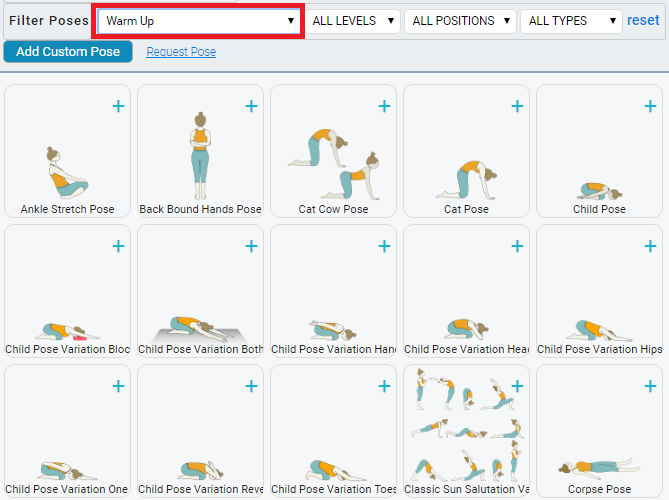
We will probably start our yoga sequence with 'warm-ups' first. So in the lists dropdown we select 'Warm-ups'.
Please see snapshot below.
We can further filter the list based on body position - standing, sitting, etc. Please see snapshot below where we
selected standing warm-up poses.
We can now add the poses to our yoga sequence by simply clicking on the yoga poses and re-ordering them.
Step 2
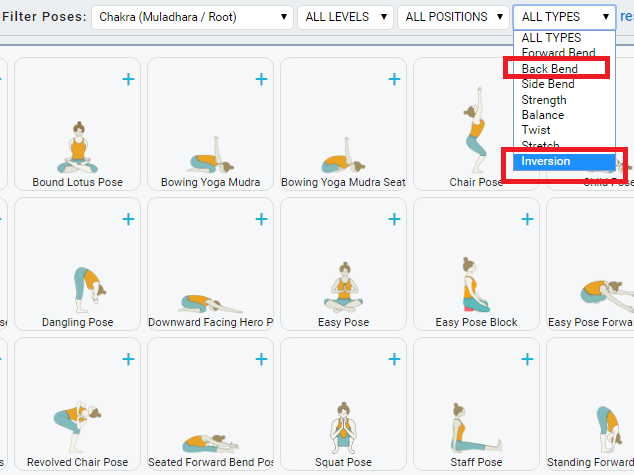
Now we select our desired list on chakras - Muladhara (Root) and select the poses we want.
We can now add the poses to our yoga sequence by simply clicking on the yoga poses and re-ordering them.
Step 3
You can even select 'Backbends', 'Inversions', 'Twists', and more under 'ALL TYPES' to further filter the lists. Please see snapshot below.
Hope you read through the above :). It should really get you started with planning your yoga sequences.
On the next page, you can now watch a video of everything you can do on our website. Please click on the below link